2023. 11. 21. 18:53ㆍ프로그래밍 공부/OOP
5.1 배열 소개
배열 선언 및 참조
배열(array): 단일 줄의 단순 코드로 선언할 수 있는 균일한 명명 메커니즘을 가진 변수 목록처럼 동작한다
지수화된 변수(indexed variable): 배열을 구성하는 개개의 변수. 첨자형 변수(subscripted variables) 또는 배열의 요소(element)라고도 불림
첨자[index], 색인[subscript]: 대괄호 안에 있는 숫자
C++에서 색인들은 0으로 시작하는 번호를 매긴다.
배열의 선언된 크기(declared size): 배열에서 색인화된 변수의 수
배열의 기본 유형(base type): 한 배열의 색인화된 변수의 종류
배열 선언
SYNTAX
Type_Name Array_Name[Declared_Size];
예
int bigArray[100];
double a[3];
double b[5];
char grade[10], oneGrade;
여기에 표시된 형식의 배열 선언은 Declared_Size 인덱스 변수,
즉 Array_Name[0]부터 Array_Name [Declared_Size–1]까지의 인덱싱된 변수를 정의한다.
각 인덱싱된 변수는 Type_Name의 변수이다.
배열 a는 인덱싱된 변수 a[0], a[1] 및 a[2]로 구성되며, 모든 타입이 double이다.
배열 b는 인덱싱된 변수 b[0], b[1], b[2], b[3] 및 b[4]로 구성되며, 모든 타입이 double이다.
배열 선언을 여기에 표시된 변수 oneGrade와 같은 간단한 변수 선언과 결합할 수 있다.
디스플레이 5.1 배열을 이용한 프로그램
//Reads in five scores and shows how much each
//score differs from the highest score.
#include <iostream>
using namespace std;

int main( )
{
	int i, score[5], max;

	cout << "Enter 5 scores:\n";
	cin >> score[0];
	max = score[0];
	for (i = 1; i < 5; i++)
	{
		cin >> score[i];
		if (score[i] > max)
			max = score[i];
			//max is the largest of the values score[0],..., score[i] .
 	}

	cout << "The highest score is " << max << endl
	     << "The scores and their\n"
	     << "differences from the highest are:\n";
	for (i = 0; i < 5; i++)
		cout << score[i] << " off by "
		     << (max – score[i]) << endl;
	return 0;
}
샘플 대화 상자
Enter 5 scores:
5 9 2 10 6
The highest score is 10
The scores and their
differences from the highest are:
5 off by 5
9 off by 1
2 off by 8
10 off by 0
6 off by 4
팁: for문을 배열과 사용하기
디스플레이 5.1의 두 번째 루프는 배열을 단계적으로 수행하는 일반적인 방법을 보여준다:
for (i = 0; i < 5; i++)
cout << score [i ] << "off by "
<< (max – score[i]) << endl;
for 문은 배열 조작에 이상적으로 적합하다.
함정: 배열 인덱스는 항상 0에서 시작한다
배열의 인덱스는 항상 0으로 시작하여 배열 크기보다 한 개 작은 정수로 끝난다.
팁: 배열 크기에 대해 정의된 상수 사용하기
디스플레이 5.1에서 각 배열의 크기에 정의된 상수를 사용해서 다음과 같이 표기할 수 있다.
const int NUMBER_OF_STUDENTS = 5;
int i, score[NUMBER_OF_STUDENTS], max;
그리고 아래와 같이 이용하고 싶을 충동도 들 것이다!
cout << "Enter number of students:\n";
cin >> number;
int score[number]; //ILLEGAL ON MANY COMPILERS!
하지만 변수가 있는 배열 크기를 지정을 해줘서는 안된다.
이와 같은 경우를 챕터10 동적 배열에서 배울 것이다.
메모리에서의 배열
바이트(bytes): 번호가 매겨진 위치의 목록
주소(address): 바이트의 수
변수의 주소(address of variable): 메모리의 주소(해당 변수의 첫 번째 바이트 위치)
디스플레이 5.2 메모리에서의 배열
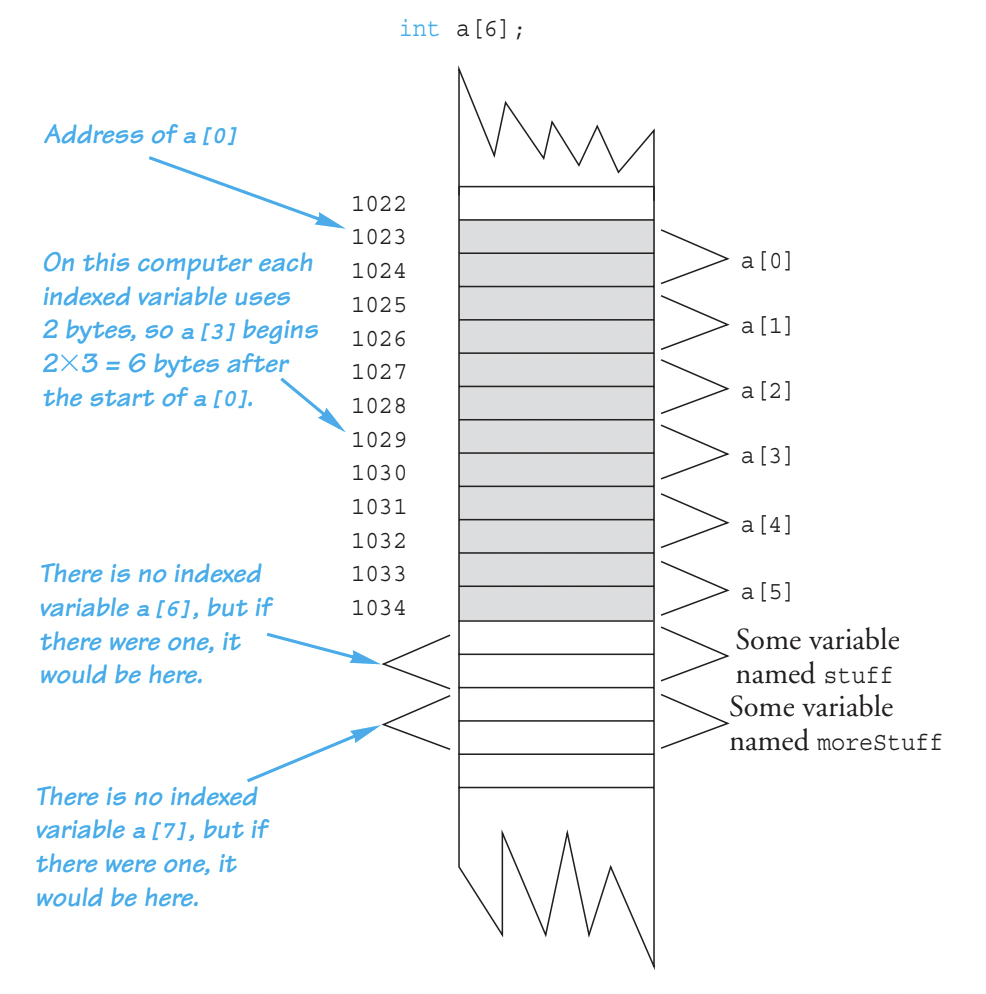
함정: 배열 인덱스가 범위를 벗어남
배열을 사용할 때 발생하는 가장 일반적인 프로그래밍 오류는 존재하지 않는 배열 인덱스를 참조하려고 시도하는 것이다.
인덱스 표현식이 배열 선언에서 허용하는 값 이외의 값으로 평가될 때, 그 인덱스는 범위를 벗어났거나(out of range) 단순히 불법적인(illegal) 것이라고 말한다.
예시)
int a[6];
a[i] = 238;
if i = 7
배열 초기화
배열이 선언되면 배열을 초기화할 수 있다.
예시)
int children[3] = {2, 12, 1};
int children[3];
children[0] = 2;
children[1] = 12;
children[2] = 1;
인덱싱된 변수보다 적은 값을 나열하면 해당 값을 사용하여 처음 몇 개의 인덱싱된 변수를 초기화하고
나머지 인덱싱된 변수는 배열 기본값의 0으로 초기화된다.
예시)
int children[5] = {2, 12, 1};
children[0] = 2;
children[1] = 12;
children[2] = 1;
children[3] = children[4] = 0;
배열이 선언될 때 초기화하면 배열의 크기를 생략할 수 있으며,
초기화 값에 필요한 최소 크기를 갖도록 배열이 자동으로 선언된다.
예시)
int b[] = {5, 12, 11};
다음과 같다.
int b[3] = {5, 12, 11};
5.2 함수에서의 배열
함수 인수로서의 색인화된 변수
색인화된 변수는 배열 기본 유형의 어떤 변수도 인수가 될 수 있는 것과 정확히 같은 방식으로 함수에 대한 인수가 될 수 있다.
예시)
double i, n, a[10];
아래의 경우들이 전부 다 가능하다.
myFunction(n);
myFunction(a[3]);
myFunction(a[i]);
myFunction(a[0]);
함수 인수로서의 전체 배열
배열 형식 매개변수 및 인수
함수에 대한 인수는 전체 배열이 될 수 있지만
전체 배열에 대한 인수는 call-by-value 인수도 아니고 call-by-reference 인수도 아니다.
이것은 배열 인수로 알려진 새로운 종류의 인수이다.
배열 인수를 배열 매개 변수에 연결할 때 함수에 주어진 것은
배열 인수의 첫 번째 인덱싱된 변수의 메모리에 있는 주소뿐이다(0으로 인덱싱된 것).
배열 인수는 함수에 배열의 크기를 알려주지 않는다.
따라서 함수에 배열 매개 변수가 있을 때 일반적으로 배열의 크기를 제공하는 형식적인 int 매개 변수도 있어야 한다(다음 예제처럼).
배열 인수는 다음과 같은 방법으로 참조에 의한 호출 인수와 같다.
함수 본체가 배열 매개변수를 변경하면 함수가 호출되면 배열 인수에 실제로 변경이 이루어진다.
따라서 함수는 배열 인수의 값을 변경할 수 있습니다.
즉, 색인화된 변수의 값을 변경할 수 있다.
배열 파라미터가 있는 함수 선언의 구문은 다음과 같다.
SYNTAX
Type_Returned Function_Name (..., Base_Type Array_Name [ ],...);
EXAMPLE
void sumArray( double& sum, double a[ ], int size);
디스플레이 5.3 배열 매개변수를 가진 함수
//Function Declaration
void fillUp( int a[], int size);
//Precondition: size is the declared size of the array a .
//The user will type in size integers .
//Postcondition: The array a is filled with size integers
//from the keyboard .

//Function Definition
void fillUp( int a[], int size)
{
	cout << "Enter " << size << " numbers:\n";
	for ( int i = 0; i < size; i++)
		cin >> a[i];
	cout << "The last array index used is " << (size – 1) << endl;
}
함수 호출 예시)
int score[5], numberOfScores = 5;
fillUp(score, numberOfScores);
const 매개변수 수정자
const 수식어: 배열 인수가 함수에 의해 변경되어서는 안 된다는 것을 컴파일러에게 알려준다.
상수 배열 매개변수(constant array parameter): const를 사용하여 변형된 배열 매개변수
예시)
void showTheWorld( int a[], int sizeOfa)
//Precondition: sizeOfa is the declared size of the array a.
//All indexed variables of a have been given values.
//Postcondition: The values in a have been written to the screen.
{
cout << "The array contains the following values:\n";
for ( int i = 0; i < sizeOfa; i++)
cout << a[i] << " ";
cout << endl;
}
더 안전하게 하기 위해 아래에 const 수식어를 넣는다.
void showTheWorld( const int a[], int sizeOfa)
배열 인수의 값을 실수로 변경하는 오류가 포함되어 있습니다.
다행히도 이 버전의 함수 정의에는 const라는 수식어가 포함되어 있어서 배열 a가 변경되었음을 오류 메시지로 알려준다.
void showTheWorld( const int a[], int sizeOfa)
//Precondition: sizeOfa is the declared size of the array a.
//All indexed variables of a have been given values.
//Postcondition: The values in a have been written to the screen.
{
cout << "The array contains the following values:\n";
for ( int i = 0; i < sizeOfa; a[i]++)
cout << a[i] << " ";
cout << endl;
}
수식어 const는 모든 종류의 파라미터와 함께 사용할 수 있지만
일반적으로 6장과 7장에서 설명하는 클래스의 배열 파라미터 및 참조별 파라미터와만 사용된다.
함정: const 매개변수의 일관되지 않은 사용
만약 당신이 특정한 종류의 배열 매개변수에 const 수식어를 사용한다면,
당신은 그 종류를 가지고 함수에 의해 변경되지 않는 다른 모든 배열 매개변수에 const 수식어를 사용해야 한다.
그 이유는 함수 호출 내의 함수 호출과 관계가 있다.
예시)
double computeAverage( int a[], int numberUsed);
//Returns the average of the elements in the first numberUsed
//elements of the array a. The array a is unchanged.
void showDifference( const int a[], int numberUsed)
{
double average = computeAverage(a, numberUsed);
cout << "Average of the " << numberUsed
<< " numbers = " << average << endl
<< "The numbers are:\n";
for ( int index = 0; index < numberUsed; index++)
cout << a[index] << " differs from average by "
<< (a[index] – average) << endl;
}
표시된 코드는 대부분의 컴파일러에서 오류 메시지 또는 경고 메시지를 제공한다.
computeAverage 함수는 매개 변수 a를 변경하지 않습니다.
그러나 컴파일러가 showDifference에 대한 함수 정의를 처리할 때 computeAverage에 const 수식어가 포함되어 있지 않아 매개 변수 a의 값을 변경한다고 생각할 것이다.
따라서 함수 showDifference에 매개 변수 a와 함께 const를 사용하는 경우 함수 computeAverage에 매개 변수 a와 함께 const라는 수식어를 사용해야 한다.
computeAverage에 대한 함수 선언은 다음과 같다:
double computeAverage( const int a[], int numberUsed);
배열을 반환하는 함수
배열을 반환하는 함수와 다소 동치인 것을 얻는 방법이 있다.
그 방법은 배열로 포인터를 반환하는 것이다.
우리는 10장에서 배열과 포인터의 상호작용에 대해 설명할 때 논의할 것이다.
예제: 생산 그래프
디스플레이 5.4에는 배열 및 여러 배열 매개변수를 사용하는 프로그램이 포함되어 있다.
Apex 플라스틱 스푼 제조 회사의 이 프로그램은 주어진 한 주 동안 네 개의 제조 공장의 생산성을 보여주는 막대 그래프를 보여준다.
공장은 티스푼 부서, 수프스푼 부서, 일반 칵테일스푼 부서, 유색 칵테일스푼 부서 등 각 부서의 개별 생산 수치를 유지한다. 또한 네 개의 공장에는 각각 다른 부서의 수가 있다.
디스플레이 5.4의 샘플 대화에서 볼 수 있듯이 그래프는 1000개 생산 단위마다 하나의 별표를 사용한다. 따라서 우리는 가장 가까운 천 개로 반올림합니다.
배열 production은 네 개의 플랜트 각각의 총 생산량을 보유합니다. 플랜트 번호 n에 대한 총 생산량을 인덱스 변수 production [n–1]로 지정했다.
출력이 수천 단위이므로, 프로그램은 배열 요소의 값을 조정합니다. 공장 번호 3의 총 출력이 4040 단위이면, production[2]의 값은 처음에는 4040으로 설정됩니다. 그런 다음 4040의 값은 4로 조정되어 production[2]의 값이 4로 변경되고 공장 번호 3의 출력을 나타내기 위해 4개의 별표가 출력된다. 이 조정은 전체 배열 production을 인수로 사용하여 배열에 저장된 값을 변경하는 함수 scale에 의해 수행된다.
함수 round은 인수를 가장 가까운 정수로 반올림한다.
디스플레이 5.4 생산 그래프 프로그램
//Reads data and displays a bar graph showing productivity for each plant.
#include <iostream>
#include <cmath>
using namespace std;
const int NUMBER_OF_PLANTS = 4;

void inputData( int a[], int lastPlantNumber);
//Precondition: lastPlantNumber is the declared size of the array a.
//Postcondition: For plantNumber = 1 through lastPlantNumber:
//a[plantNumber-1] equals the total production for plant number
//plantNumber.

void scale( int a[], int size);
//Precondition: a[0] through a[size-1] each has a nonnegative value .
//Postcondition: a[i] has been changed to the number of 1000s (rounded to
//an integer) that were originally in a[i], for all i such that 0 <= i
//<= size-1.

void graph( const int asteriskCount[], int lastPlantNumber);
//Precondition: a[0] through a[lastPlantNumber-1] have nonnegative values.
//Postcondition: A bar graph has been displayed saying that plant
//number N has produced a[N-1] 1000s of units, for each N such that
//1 <= N <= lastPlantNumber

void getTotal( int& sum);
//Reads nonnegative integers from the keyboard and
//places their total in sum .

int round( double number);
//Precondition: number >= 0 .
//Returns number rounded to the nearest integer .

void printAsterisks( int n);
//Prints n asterisks to the screen.

int main( )
{
	int production[NUMBER_OF_PLANTS];

	cout << "This program displays a graph showing\n"
	     << "production for each plant in the company.\n";

	inputData(production, NUMBER_OF_PLANTS);
	scale(production, NUMBER_OF_PLANTS);
	graph(production, NUMBER_OF_PLANTS);
	return 0;
}

void inputData( int a[], int lastPlantNumber)
{
	for ( int plantNumber = 1;
	                plantNumber <= lastPlantNumber; plantNumber++)
	{
		cout << endl
		     << "Enter production data for plant number "
		     << plantNumber << endl;
		getTotal(a[plantNumber – 1]);
	}
}

void getTotal( int& sum)
{
	cout << "Enter number of units produced by each department.\n"
	     << "Append a negative number to the end of the list.\n";

	sum = 0;
	int next;
	cin >> next;
	while (next >= 0)
	{
		sum = sum + next;
		cin >> next;
	}

	cout << "Total = " << sum << endl;
}

void scale( int a[], int size)
{
	for ( int index = 0; index < size; index++)
		a[index] = round(a[index]/1000.0);
}

int round( double number)
{
	return static_cast<int>(floor(number + 0.5));
}

void graph( const int asteriskCount[], int lastPlantNumber)
{
	cout << "\nUnits produced in thousands of units:\n\n";
	for ( int plantNumber = 1;
	             plantNumber <= lastPlantNumber; plantNumber++)
	{
		cout << "Plant #" << plantNumber << " ";
		printAsterisks(asteriskCount[plantNumber – 1]);
		cout << endl;
	}
}

void printAsterisks( int n)
{
	for ( int count = 1; count <= n; count++)
		cout << "*";
}
샘플 대화 상자
This program displays a graph showing
Production for each plant in the company.
Enter production data for plant number 1
Enter number of units produced by each department.
Append a negative number to the end of the list.
2000 3000 1000 -1
Total = 6000
Enter production data for plant number 2
Enter number of units produced by each department.
Append a negative number to the end of the list.
2050 3002 1300 -1
Total = 6352
Enter production data for plant number 3
Enter number of units produced by each department.
Append a negative number to the end of the list.
5000 4020 500 4348 -1
Total = 13868
Enter production data for plant number 4
Enter number of units produced by each department.
Append a negative number to the end of the list.
2507 6050 1809 –1
Total = 10366
Units produced in thousands of units:
Plant #1 ******
Plant #2 ******
Plant #3 **************
Plant #4 **********
5.3 배열로 프로그래밍
부분적으로 채워진 배열
배열에 필요한 정확한 크기를 알 수 없는 경우나 프로그램 실행 시마다 크기가 다를 때
배열을 프로그램이 필요로 할 수 있는 가장 큰 크기로 선언하는 방법이 있다
부분적으로 채워진 배열 사용 시 주의점
1. 프로그램은 얼마나 많은 배열이 사용되었는지 추적해야 한다.
2. 값이 주어지지 않은 색인화된 변수를 참조해서는 안 된다.
디스플레이 5.5 부분적으로 채워진 배열
//Shows the difference between each of a list of golf scores and
//their average .

#include <iostream>
using namespace std;
const int MAX_NUMBER_SCORES = 10;

void fillArray( int a[], int size, int& numberUsed);
//Precondition: size is the declared size of the array a .
//Postcondition: numberUsed is the number of values stored in a .
//a[0] through a[numberUsed-1] have been filled with
//nonnegative integers read from the keyboard .

double computeAverage( const int a[], int numberUsed);
//Precondition: a[0] through a[numberUsed-1] have values;
//numberUsed > 0.
//Returns the average of numbers a[0] through a[numberUsed-1] .

void showDifference( const int a[], int numberUsed);
//Precondition: The first numberUsed indexed variables of a have values .
//Postcondition: Gives screen output showing how much each of the first
//numberUsed elements of the array a differs from their average.
int main( )
{
	int score[MAX_NUMBER_SCORES], numberUsed;
	cout << "This program reads golf scores and shows\n"
	     << "how much each differs from the average.\n";

	cout << "Enter golf scores:\n";

	fillArray(score, MAX_NUMBER_SCORES, numberUsed);
	showDifference(score, numberUsed);

	return 0;
}

void fillArray( int a[], int size, int& numberUsed)
{
	cout << "Enter up to " << size << " nonnegative whole numbers.\n"
	     << "Mark the end of the list with a negative number.\n";
	int next, index = 0;
	cin >> next;
	while ((next >= 0) && (index < size))
	{
		a[index] = next;
		index++;
		cin >> next;
	}
	numberUsed = index;
}

double computeAverage( const int a[], int numberUsed)
{
	double total = 0;
	for (int index = 0; index < numberUsed; index++)
		total = total + a[index];
	if (numberUsed > 0)
	{
		return (total/numberUsed);
	}
	else
	{
		cout << "ERROR: number of elements is 0 in computeAverage.\n"
		     << "computeAverage returns 0.\n";
		return 0;
	}
}

void showDifference( const int a[], int numberUsed)
{
	double average = computeAverage(a, numberUsed);
	cout << "Average of the " << numberUsed
	     << " scores = " << average << endl
	     << "The scores are:\n";
	for ( int index = 0; index < numberUsed; index++)
		cout << a[index] << " differs from average by "
		     << (a[index] – average) << endl;
}
샘플 대화 상자
This program reads golf scores and shows
how much each differs from the average.
Enter golf scores:
Enter up to 10 nonnegative whole numbers.
Mark the end of the list with a negative number.
69 74 68 -1
Average of the 3 scores = 70.3333
The scores are: 69
differs from average by –1.33333
74 differs from average by 3.66667
68 differs from average by –2.33333
팁: 공식 매개변수를 생략하지 말자
디스플레이 5.5의 fillArray 함수에 주목하십시오.
fillArray가 호출되면 다음 디스플레이 5.5의 함수 호출과 같이
선언된 배열 크기 MAX_NUMBER_SCORES가 인수 중 하나로 제공된다:
fillArray(score, MAX_NUMBER_SCORES, numberUsed);
MAX_NUMBER_SCORES는 전역적으로 정의된 상수이므로 생략하고
fillArray의 정의에 사용가능하다고 생각할 수 있다.
디스플레이 5.5에 있는 프로그램 이외의 프로그램에서 fillArray를 사용하지 않았다면
MAX_NUMBER_SCORES를 인수로 채우지 않고도 배열을 채울 수 있다.
그러나 fillArray는 여러 다른 프로그램에서 사용할 수 있는 일반적으로 유용한 함수이다.
만약 우리가 전역 상수 MAX_NUMBER_SCORES를 함수 fillArray의 본문에 썼다면
디스플레이 5.6의 프로그램에서 함수를 재사용할 수 없었을 것이다.
우리가 한 프로그램에서만 fillArray를 사용했더라도
선언된 배열 크기를 fillArray의 인수로 만드는 것은 좋은 방법이다.
선언된 배열 크기를 인수로 표시하는 것은
함수가 이 정보를 매우 중요하게 필요로 한다는 것을 알려준다.
예: 배열 탐색
일반적인 프로그래밍 작업은 배열에서 주어진 값을 찾는 것이다.
예를 들어 배열에는 주어진 과정에 있는 모든 학생들의 학생 번호가 포함되어 있을 수 있다.
특정 학생이 등록되어 있는지 여부를 알려주기 위해 배열을 검색하여 학생의 번호가 포함되어 있는지 확인한다.
그림 5.6의 간단한 프로그램이 배열을 채운 다음 사용자가 지정한 값을 배열에서 검색한다.
이것은 순차 검색 알고리즘의 모든 필수 요소를 보여준다.
프로그램은 목표 수가 배열 요소들 중 어느 것과 동일한지를 먼저부터 끝까지 순서대로 배열 요소들을 조사한다.
그림 5.6에서 함수 search는 배열을 검색하는 데 사용된다.
목표 값이 배열에 있다면 search는 배열에서 목표 값의 위치를 나타내는 색인을 반환한다.
목표 값이 배열에 없으면 search는 –1을 반환한다.
함수 search는 배열 요소가 표적 값과 동일한지 확인하기 위해 while문을 사용한다.
found 변수는 표적 요소가 발견되었는지 여부를 기록하는 플래그로 사용된다.
만약 표적 요소가 배열에서 발견되면 found는 true로 설정되고, 이로써 while문은 종료된다.
디스플레이 5.6 배열 탐색
//Searches a partially filled array of nonnegative integers .
#include <iostream>
using namespace std;
const int DECLARED_SIZE = 20;

void fillArray( int a[], int size, int& numberUsed);
//Precondition: size is the declared size of the array a .
//Postcondition: numberUsed is the number of values stored in a .
//a[0] through a[numberUsed-1] have been filled with
//nonnegative integers read from the keyboard .

int search( const int a[], int numberUsed, int target);
//Precondition: numberUsed is <= the declared size of a.
//Also, a[0] through a[numberUsed –1] have values .
//Returns the first index such that a[index] == target ,
//provided there is such an index; otherwise, returns –1 .

int main( )
{
	int arr[DECLARED_SIZE], listSize, target;

	fillArray(arr, DECLARED_SIZE, listSize);

	char ans;
	int result;
	do
	{
		cout << "Enter a number to search for: ";
		cin >> target;

		result = search(arr, listSize, target);
		if (result == –1)
			cout << target << " is not on the list.\n";
		else
			cout << target << " is stored in array position "
			     << result << endl
			     << "(Remember: The first position is 0.)\n";
		cout << "Search again?(y/n followed by Return): ";
		cin << ans;
	} while ((ans != 'n') && (ans != 'N'));
	cout << "End of program.\n";
	return 0;
}

void fillArray( int a[], int size, int& numberUsed)
< The rest of the definition of fillArray is given in Display 5.5 >

int search( const int a[], int numberUsed, int target)
{
	int index = 0;
	bool found = false;

	while ((!found) && (index < numberUsed))
	if (target == a[index])
		found = true;
	else
		index++;

	if (found)
		return index;
	else
		return –1;
}
샘플 대화 상자
Enter up to 20 nonnegative whole numbers.
Mark the end of the list with a negative number.
10 20 30 40 50 60 70 80 –1
Enter a number to search for: 10
10 is stored in array position 0
(Remember: The first position is 0.)
Search again?(y/n followed by Return): y
Enter a number to search for: 40
40 is stored in array position 3
(Remember: The first position is 0.)
Search again?(y/n followed by Return): y
Enter a number to search for: 42
42 is not on the list.
Search again?(y/n followed by Return): n
End of program.
예: 배열 정렬
이 예는 부분적으로 채워진 숫자 배열을 작은 값에서 큰 값으로 정렬하도록 정렬하는 sort이라는 함수를 설명한다.
배열 매개변수 a: 부분적으로 채워지는 배열
매개변수 numberUsed: 배열 위치가 얼마나 많이 사용되는지 알려준다.
따라서 함수 sort의 선언과 전제조건은 다음과 같다:
void sort( int a[], int numberUsed);
//Precondition: numberUsed <= declared size of the array a .
//The array elements a[0] through a[numberUsed–1] have values .
함수 sort는 배열 a의 요소를 재배열하여 함수 호출이 완료된 후 요소가 다음과 같이 정렬되도록 한다:
a[0] ≤ a[1] ≤ a[2] ≤ ... ≤ a[numberUsed –1]
우리가 현재 정렬을 할 때 사용하는 알고리즘은 선택 정렬이라고 불린다.
알고리즘을 설계하는 한 가지 방법은 문제의 정의에 의존하는 것이다.
이 경우에 문제는 배열 a를 가장 작은 것에서 가장 큰 것으로 정렬하는 것이다.
즉, a[0]이 가장 작고, a[1]이 다음으로 작아지도록 값을 정렬하는 것을 의미한다.
이 정의는 선택 정렬 알고리즘의 개요를 제공한다:
for ( int index = 0; index < numberUsed; index++)
Place the indexth smallest element in a[index]
알고리즘이 어떻게 작동하는지 구체적인 예를 살펴보도록 하겠다.
그림 5.7의 배열을 생각해 보라.
알고리즘은 가장 작은 값을 a[0] 안에 넣을 것이다.
가장 작은 값은 a[3] 안의 값이므로 알고리즘은 a[0]과 a[3]의 값을 교환한다.
a[0] 안의 값은 이제 가장 작은 원소가 된다.
그런 다음 알고리즘은 그 다음으로 작은 원소를 찾는다.
그 다음으로 작은 원소는 나머지 원소 a[1], a[2], a[3], ..., a[9] 중 가장 작다.
그림 5.7의 예제에서 그 다음으로 작은 원소는 a[5] 안에 있으므로 알고리즘은 a[1]과 a[5]의 값을 교환한다.
두 번째로 작은 원소의 위치 지정은 그림 5.7의 네 번째와 다섯 번째 배열 그림에 나와 있다.
그런 다음 알고리즘은 세 번째로 작은 원소의 위치를 지정한다.
정렬이 진행되면 처음 배열된 원소는 올바른 정렬된 값과 동일하다.
디스플레이 5.7 선택 정렬
a[0] a[1] a[2] a[3] a[4] a[5] a[6] a[7] a[8] a[9]
| 8 | 6 | 10 | 2 | 16 | 4 | 18 | 14 | 12 | 20 |
| 8 | 6 | 10 | 2 | 16 | 4 | 18 | 14 | 12 | 20 |
| 2 | 6 | 10 | 8 | 16 | 4 | 18 | 14 | 12 | 20 |
| 2 | 6 | 10 | 8 | 16 | 4 | 18 | 14 | 12 | 20 |
| 2 | 4 | 10 | 8 | 16 | 6 | 18 | 14 | 12 | 20 |
디스플레이 5.8 배열 정렬
//Tests the procedure sort .
#include <iostream>
using namespace std;

void fillArray( int a[], int size, int& numberUsed);
//Precondition: size is the declared size of the array a .
//Postcondition: numberUsed is the number of values stored in a .
//a[0] through a[numberUsed – 1] have been filled with
//nonnegative integers read from the keyboard .

void sort( int a[], int numberUsed);
//Precondition: numberUsed <= declared size of the array a.
//The array elements a[0] through a[numberUsed – 1] have values .
//Postcondition: The values of a[0] through a[numberUsed – 1] have
//been rearranged so that a[0] <= a[1] <= ... <= a[numberUsed – 1] .

void swapValues( int& v1, int& v2);
//Interchanges the values of v1 and v2 .

int indexOfSmallest( const int a[ ], int startIndex, int numberUsed);
//Precondition: 0 <= startIndex < numberUsed. Reference array elements
//have values. Returns the index i such that a[i] is the smallest of the
//values a[startIndex], a[startIndex + 1], ..., a[numberUsed – 1] .

int main( )
{
	cout << "This program sorts numbers from lowest to highest.\n";

	int sampleArray[10], numberUsed;
	fillArray(sampleArray, 10, numberUsed);
	sort(sampleArray, numberUsed);

	cout << "In sorted order the numbers are:\n";
	for ( int index = 0; index < numberUsed; index++)
		cout << sampleArray[index] << " ";
	cout << endl;

	return 0;
}

void fillArray( int a[], int size, int& numberUsed)
< The rest of the definition of fillArray is given in Displays 5.5.>

void sort( int a[], int numberUsed)
{
	int indexOfNextSmallest;
	for ( int index = 0; index < numberUsed – 1; index++)
	{ //Place the correct value in a[index] :
		indexOfNextSmallest =
		indexOfSmallest(a, index, numberUsed);
		swapValues(a[index], a[indexOfNextSmallest]);
		//a[0] <= a[1] <= ... <= a[index] are the smallest of the
		//original array elements. The rest of the
		//elements are in the remaining positions .
	}
}

void swapValues( int& v1, int& v2)
{
	int temp;
	temp = v1;
	v1 = v2;
	v2 = temp;
}

int indexOfSmallest( const int a[], int startIndex, int numberUsed)
{
	int min = a[startIndex],
	    indexOfMin = startIndex;

	for ( int index = startIndex + 1; index < numberUsed; index++)
		if (a[index] < min)
		{
			min = a[index];
			indexOfMin = index;
			//min is the smallest of a[startIndex] through a[index]
		}

	return indexOfMin;
}
샘플 대화 상자
This program sorts numbers from lowest to highest.
Enter up to 10 nonnegative whole numbers.
Mark the end of the list with a negative number.
80 30 50 70 60 90 20 30 40 –1
In sorted order the numbers are:
20 30 30 40 50 60 70 80 90
5.4 다차원 배열
다차원 배열 기본사항
다차원(Multidimensional) 배열 선언
SYNTAX
Type Array_Name [Size_Dim_1][Size_Dim_2]...[Size_Dim_Last];
EXAMPLES
char page[30][100];
int matrix[2][3];
double threeDPicture[10][20][30];
여기에 표시된 형태의 배열 선언은 배열 인덱스들의 각 조합에 대해 하나의 색인화된 변수를 정의합니다.
예를 들어, 이전의 샘플 선언 중 두 번째는 배열 행렬에 대해 다음과 같은 여섯 개의 색인화된 변수를 정의합니다:
matrix[0][0], matrix[0][1], matrix[0][2],
matrix[1][0], matrix[1][1], matrix[1][2]
다차원 배열 매개변수
함수 표제나 함수 선언에서 다차원 배열 매개변수가 주어지면
첫 번째 차원의 크기는 주어지지 않지만 나머지 차원의 크기는 대괄호로 주어져야 한다.
첫 번째 차원의 크기가 주어지지 않기 때문에
일반적으로 이 첫 번째 차원의 크기를 주는 int형의 매개변수가 추가로 필요하다.
2차원 배열 매개변수 p를 갖는 함수 선언의 예:
void getPage( char p[][100], int sizeDimension1);
예제: 이차원 등급 프로그램
디스플레이 5.9에는 grade라는 이름의 2차원 배열을 사용하여
소규모 학급의 성적 기록을 저장하고 표시하는 프로그램이 포함되어 있다.
학급에는 4명의 학생이 있으며 기록에는 3개의 퀴즈가 포함되어 있다.
디스플레이 5.10에서는 배열 grade가 데이터를 저장하는 데 사용되는 방법을 보여준다.
첫 번째 배열 인덱스는 학생을 지정하는 데 사용되고 두 번째 배열 인덱스는 퀴즈를 지정하는 데 사용된다.
학생과 퀴즈에는 0이 아니라 1로 시작하는 번호가 매겨지므로
학생 번호에서 1을 빼고 퀴즈 번호에서 1을 빼야 특정 퀴즈 점수를 저장하는 색인 변수를 얻을 수 있다.
예를 들어, 학생 번호 4가 퀴즈 1번에서 받은 점수는 grade[3][0]에 기록된다.
또한 프로그램은 일반적인 2개의 1차원 배열을 사용한다.
배열 stAve는 각 학생의 평균 퀴즈 점수를 기록하는 데 사용된다.
예를 들어, 프로그램은 stAve[0]을 학생 1이 받은 퀴즈 점수의 평균과 동일한 것으로,
stAve[1]을 학생 2가 받은 퀴즈 점수의 평균과 동일한 것으로 설정한다.
배열 quizAve는 각 퀴즈의 평균 점수를 기록하는 데 사용된다.
예를 들어, 프로그램은 quizAve[0]을 퀴즈 1의 모든 학생 점수의 평균 점수와 같은 것으로,
quizAve[1]을 퀴즈 2의 모든 학생의 평균 점수와 같은 것으로 설정한다.
디스플레이 5.10은 배열 grade, stAve 및 quizAve 사이의 관계를 보여준다.
이 디스플레이는 배열 grade에 대한 일부 샘플 데이터를 보여준다.
이 데이터는 프로그램이 stAve와 quizAve에 저장한 값을 결정한다.
디스플레이 5.11은 또한 이 값을 표시하고 프로그램은 stAve와 quizAve에 대해 계산한다.
배열 grade를 채운 다음 학생 평균과 퀴즈 평균을 모두 계산하여 표시하는 전체 프로그램을 화면 5.9에 표시한다.
이 프로그램에서 다차원 배열을 전역 이름 상수로 선언했다.
절차는 이 프로그램에만 적용되므로 다른 곳에서는 재사용할 수 없으므로
다차원 배열의 크기에 대한 매개 변수를 사용하지 않고 전역적으로 정의된 상수를 사용했다.
루틴이기 때문에 배열을 채우는 코드가 디스플레이에 표시되지 않는다.
디스플레이 5.9 이차원 배열
//Reads quiz scores for each student into the two-dimensional array
//grade (but the input code is not shown in this display).
//Computes the average score for each student and the average score
//for each quiz. Displays the quiz scores and the averages .
#include <iostream>
#include <iomanip>
using namespacestd;
const int NUMBER_STUDENTS = 4, NUMBER_QUIZZES = 3;
void computeStAve(const int grade[][NUMBER_QUIZZES], double stAve[]);
//Precondition: Global constants NUMBER_STUDENTS and NUMBER_QUIZZES
//are the dimensions of the array grade. Each of the indexed variables
//grade[stNum-1, quizNum-1] contains the score for student stNum on
//quiz quizNum .
//Postcondition: Each stAve[stNum-1] contains the average for student
//number stNum.

void computeQuizAve( const int grade[][NUMBER_QUIZZES],
                     double quizAve[]);
//Precondition: Global constants NUMBER_STUDENTS and NUMBER_QUIZZES
//are the dimensions of the array grade. Each of the indexed variables
//grade[stNum-1, quizNum-1] contains the score for student stNum on
//quiz quizNum .
//Postcondition: Each quizAve[quizNum-1] contains the average for
//quiz numbered quizNum .

void display( const int grade[][NUMBER_QUIZZES],
                        const double stAve[],
                        const double quizAve[]);
//Precondition: Global constants NUMBER_STUDENTS and NUMBER_QUIZZES
//are the dimensions of the array grade. Each of the indexed variables
//grade[stNum-1 , quizNum-1] contains the score for student stNum on
//quiz quizNum. Each stAve[stNum-1] contains the average for student
//stNum. Each quizAve[quizNum-1] contains the average for quiz
//numbered quizNum.
//Postcondition: All the data in grade, stAve, and quizAve have been
//output .
int main( )
{
	int grade[NUMBER_STUDENTS][NUMBER_QUIZZES];
	double stAve[NUMBER_STUDENTS];
	double quizAve[NUMBER_QUIZZES];

< The code for filling the array grade goes here, but is not shown. >

	computeStAve(grade, stAve);
	computeQuizAve(grade, quizAve);
	display(grade, stAve, quizAve);
	return 0;
}
void computeStAve( const int grade[][NUMBER_QUIZZES], double stAve[])
{
	for ( int stNum = 1; stNum <= NUMBER_STUDENTS; stNum++)
	{ //Process one stNum:
		double sum = 0;
		for ( int quizNum = 1; quizNum <= NUMBER_QUIZZES; quizNum++)
			sum = sum + grade[stNum–1][quizNum–1];
		//sum contains the sum of the grades for student number stNum .
		stAve[stNum–1] = sum/NUMBER_QUIZZES;
		//Average for student stNum is the value of stAve[stNum-1]
	}
}

void computeQuizAve( const int grade[][NUMBER_QUIZZES],
                     double quizAve[])
{
	for ( int quizNum = 1; quizNum <= NUMBER_QUIZZES; quizNum++)
	{ //Process one quiz (for all students):
		double sum = 0;
		for ( int stNum = 1; stNum <= NUMBER_STUDENTS; stNum++)
			sum = sum + grade[stNum–1][quizNum–1];
		//sum contains the sum of all student scores on quiz number
		//quizNum .
		quizAve[quizNum–1] = sum/NUMBER_STUDENTS;
		//Average for quiz quizNum is the value of quizAve[quizNum-1]
	}
}

void display( const int grade[][NUMBER_QUIZZES],
                        const double stAve[], const double quizAve[])
{
	cout.setf(ios::fixed);
	cout.setf(ios::showpoint);
	cout.precision(1);

	cout << setw(10) << "Student"
	     << setw(5) << "Ave"
	     << setw(15) << "Quizzes\n";
	for ( int stNum = 1; stNum <= NUMBER_STUDENTS; stNum++)
	{ //Display for one stNum:
		cout << setw(10) << stNum
		     << setw(5) << stAve[stNum–1] << " ";
		for ( int quizNum = 1; quizNum <= NUMBER_QUIZZES; quizNum++)
			cout << setw(5) << grade[stNum–1][quizNum–1];
		cout << endl;
	}

	cout << "Quiz averages = ";
	for ( int quizNum = 1; quizNum <= NUMBER_QUIZZES; quizNum++)
		cout << setw(5) << quizAve[quizNum–1];
	cout << endl;
}
샘플 대화 상자
< 배열 등급을 채우기 위한 대화 상자가 표시되지 않습니다.>
   Student  Ave        Quizzes
         1 10.0   10   10   10
         2  1.0    2    0    1
         3  7.7    8    6    9
         4  7.3    8    4   10
Quiz Average =   7.0  5.0  7.5
디스플레이 5.10 이차원 배열 grade
| quiz 1 | quiz 2 | quiz 3 | ||
| student 1 | grade[0][0] | grade[0][1] | grade[0][2] | 1 |
| student 2 | grade[1][0] | grade[1][1] | grade[1][2] | 2 |
| student 3 | grade[2][0] | grade[2][1] | grade[2][2] | 3 |
| student 4 | grade[3][0] | grade[3][1] | grade[3][2] | 4 |
| grade[3][0] is the grade that student 4 received on quiz 1. |
grade[3][1] is the grade that student 4 received on quiz 2. |
grade[3][2] is the grade that student 4 received on quiz 3. |
디스플레이 5.11 이차원 배열 grade
| quiz 1 | quiz 2 | quiz 3 | |||
| student 1 | 10 | 10 | 10 | 10.0 | stAve[0] |
| student 2 | 2 | 0 | 1 | 1.0 | stAve[1] |
| student 3 | 8 | 6 | 9 | 7.7 | stAve[2] |
| student 4 | 8 | 4 | 10 | 7.3 | stAve[3] |
| quizAve | 7.0 | 5.0 | 7.5 | ||
| quizAve[0] | quizAve[1] | quizAve[2] |
'프로그래밍 공부 > OOP' 카테고리의 다른 글
| 7장 생성자와 다른 도구 (1) | 2023.11.24 |
|---|---|
| 6장 구조체와 클래스 (1) | 2023.11.22 |
| 4장 매개변수와 오버로딩 (0) | 2023.11.05 |
| 3장 함수 기초 (1) | 2023.11.04 |
| 2장 제어 흐름 (0) | 2023.10.30 |